

.png?width=200&height=45&name=ComplyScore%20Logo%20Transparent%20(1).png)


.webp?width=869&height=597&name=image%20(5).webp)


-1.png?width=486&height=315&name=IDC%20Banner%20(1)-1.png)



.png?width=300&height=175&name=Rectangle%2034624433%20(2).png)


.webp?width=1280&height=720&name=Medtech%20Breakthrough%20Award%20Winner%20(1).webp)










It-infrastructure
ComplyScore® Launches World’s First Headless TPRM, Bringing Conversational AI to Compliance Management. 
ComplyScore® Launches World’s First Headless TPRM, Bringing Conversational AI to Compliance Management.


Optimize and secure provider data

Streamline provider-payer interactions

Verify real-time provider data

Verify provider data, ensure compliance

Create accurate, printable directories
Reduce patient wait times efficiently.

Many organizations today find themselves data-rich but insight-poor. They collect vast amounts of information from sales, marketing, and operations, yet this data remains locked in silos, inaccessible to the business users who need it most.
The integration of Snowflake and Power BI is engineered to solve this exact problem. By pairing Snowflake's immense data processing power with Power BI's intuitive interface, companies are finally bridging the gap between their data and decision-makers. The following examples showcase how this synergy is being applied to solve critical business challenges in real-time.
With Snowflake and Power BI working together, organizations can move from raw data to informed action faster, smarter, and at scale.
In the following sections, we’ll explain:
Power BI and Snowflake are fundamentally different tools that serve complementary roles in modern data analytics architecture. Understanding their distinct purposes helps organizations build more effective data strategies.
Snowflake is a cloud-based data warehousing platform that serves as the backbone of your data infrastructure. Think of it as a sophisticated database system designed for:
Snowflake excels at the "heavy lifting" of data operations: storing massive volumes of structured and semi-structured data, performing complex calculations, and serving as a centralized repository. However, it doesn't create visualizations or user-friendly reports; instead, it provides the processed data that other tools can access.
Power BI is a business intelligence and data visualization tool designed to make data accessible to business users. Its primary functions include:
Unlike Snowflake, Power BI doesn't store large datasets permanently (except when importing data directly into reports). Instead, it connects to data sources and presents information in an intuitive, visual format that supports decision-making.
Many organizations combine Snowflake and Power BI because they address different aspects of the data analytics pipeline:
This combination delivers the best of both worlds: enterprise-grade data warehousing capabilities paired with user-friendly business intelligence tools, creating a comprehensive analytics solution that scales with organizational needs.
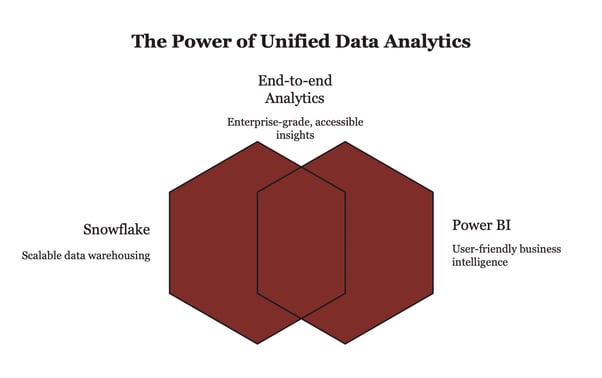
Although Power BI and Snowflake currently integrate smoothly, their partnership hasn't always been trouble-free. The underlying issue stems from Microsoft's preference for users to remain within its own Azure environment, given its data warehouse offering, Azure Synapse Analytics. In contrast, Snowflake promotes the use of DirectQuery from BI tools such as Power BI to optimize real-time data access and cloud computing utilization.
While Power BI's Import mode prioritizes speed by storing data in memory, it achieves this by limiting real-time interaction and reducing queries to Snowflake, thereby lowering costs. However, this approach also creates a paradox, as Microsoft and Snowflake collaborate to benefit users, yet they have conflicting interests.
A native Power BI-Snowflake connector with Azure AD SSO was introduced in late 2019, and since then, significant improvements have been made, including the addition of custom SQL support and query performance enhancements up to 2023. As a result, the two platforms now work together seamlessly, despite their differing strategic objectives.
By integrating Power BI with Snowflake, businesses can tap into the full capabilities of Microsoft's Power Platform, enabling them to leverage Power Apps and Power Automate to create custom applications and automate workflows that incorporate Snowflake data beyond traditional dashboards.
At its core, the Power Platform transforms Snowflake from a standard data repository into a dynamic hub for analytics, application development, and automation across the entire organization.
Using Power BI with Snowflake offers powerful analytics and flexibility, but costs can rise quickly if you don’t manage the usage. Snowflake charges based on per-second compute usage, so the more queries Power BI sends, the more you will pay.
This is especially important in DirectQuery mode, where every click, page load, or filter change can trigger new queries to Snowflake.
Here are some best practices to help you control costs while keeping performance high:
If your data does not change frequently, import it into Power BI’s in-memory engine. This reduces the number of live queries sent to Snowflake and improves dashboard speed.
Snowflake can cache results from identical queries. If the same query runs again, Snowflake can return the cached result instead of using compute resources to process it again.
Avoid using large compute warehouses for simple tasks. Select a warehouse size that fits the complexity of your queries to avoid overpaying for unused power.
Enable auto-suspend settings in Snowflake so that warehouses pause when they are not in use. This helps prevent paying for idle compute time.
Use SQL to reduce the volume of data before it reaches Power BI. Loading only the necessary data keeps reports faster and reduces query costs.
Dashboards that use DirectQuery and have many visuals can trigger dozens of queries every time they load. Reduce the number of visuals, or use Composite Models that combine Import and DirectQuery modes for a more efficient balance.

The union of Power BI and Snowflake is driving a revolution in decision-making across various sectors. The integrations enables businesses to quickly identify trends, react promptly, and make more informed strategic plans. Here are a few real-world examples:
Financial institutions and fintech companies process a vast number of transactions daily. By storing transaction records in Snowflake and using Power BI for analysis, they can establish real-time fraud detection systems that identify unusual activity. Additionally, Power BI's integrated AI capabilities enable it to forecast potential risks or pinpoint suspicious accounts before fraudulent activity takes place.
Healthcare institutions and service providers must adhere to stringent guidelines for safeguarding patient confidentiality and upholding care standards. Snowflake ensures the secure storage of sensitive medical information, while Power BI facilitates the creation of compliance reports. These reports enable healthcare teams to monitor access records, patient care schedules, and treatment authorizations, maintaining compliance without being overwhelmed by administrative tasks.
For retail companies, having real-time visibility into inventory levels and locations is essential. With this integration, retailers can monitor product movement in real-time, enabling them to prevent stock shortages, accurately predict demand, and streamline their supply chain operations.
For companies providing long-term managed IT or cybersecurity services, providing clear and transparent reporting is a key factor that sets them apart from competitors. For example, Atlas Systems can create customized executive dashboards for each client, showcasing system availability, incident patterns, SLA performance, security notifications, and user behavior. These reports enable organizations to effectively communicate their value to stakeholders and make quarterly business reviews more informative and data-driven.
Many businesses face challenges with underutilized software subscriptions and unforeseen cloud expense increases. By combining license usage data and cloud billing records with Snowflake, Atlas Systems can create Power BI dashboards that enable clients to track subscription usage, detect dormant accounts, and examine cost areas. This information empowers procurement teams to re-negotiate agreements or terminate inactive subscriptions, resulting in significant long-term cost reductions.
Each of these industries uses the strengths of Snowflake’s data processing and Power BI’s user-friendly dashboards to solve very different problems. That’s the beauty of this pairing; it’s flexible enough to fit any data-driven business, no matter the vertical. This combination of Snowflake's data capabilities and Power BI's intuitive dashboards allows each industry to tackle unique challenges, making it a versatile solution for any data-intensive business across various sectors.
Selecting the ideal partner for integrating Snowflake and Power BI can be the deciding factor between a project that's stuck in neutral and one that delivers a smooth, high-speed analytics experience. Atlas Systems distinguishes itself in four critical areas:
With over two decades of expertise in data management and analytics, Atlas Systems has successfully served more than 100 international clients across highly regulated sectors, including healthcare, finance, and manufacturing. Their teams possess in-depth knowledge of Snowflake's cloud architecture and Power BI's advanced modelling and optimization capabilities. Atlas Systems ensures rapid data delivery and provides strategic guidance on query modes to yield high-performance dashboards and reports.
Beyond simply connecting tools, Atlas delivers full-lifecycle services, from initial Snowflake data warehouse setup to embedding reports in Power Apps. Their AI/ML platform, data governance frameworks, and cloud infrastructure expertise ensure your Snowflake - Power Platform integration aligns with broader IT and compliance strategies.
As a long-standing partner of Snowflake and Microsoft, Atlas enjoys exclusive access to emerging platform features and dedicated support channels from both companies. This privileged status allowed Atlas Systems to be one of the early integrators of the Snowflake Power Platform connector preview and Azure AD Single Sign-On, ensuring secure and seamless authentication to Snowflake. Atlas's strong vendor relationships also yield quicker issue resolution, more efficient licensing, and priority access to the latest performance and security updates.
When organizations collaborate with Atlas Systems, they not only close the technical divide between Snowflake's robust backend and Power BI's agile frontend, but also secure a reliable partner that oversees the entire analytics process to achieve peak performance, manage costs effectively, and maintain regulatory adherence.
Power BI is a business analytics tool that generates interactive dashboards and visual reports. In contrast, Snowflake is a cloud-based data storage system designed for large-scale data management and SQL analysis. While Snowflake handles data storage, processing, and security, Power BI transforms that data into visualizations for business users. Together, they create a robust analytics platform: Snowflake serves as the data foundation, and Power BI offers an interactive interface.
Snowflake is not a business intelligence tool, but rather a cloud-based data platform that handles data storage, processing, and analysis. It's primarily used for storing, transforming, and querying data, whereas business intelligence tools like Power BI or Tableau are used on top of Snowflake to create visualizations and reports.
Power Apps can indeed connect to Snowflake via Microsoft’s Snowflake connector called Preview. This enables developers to integrate Snowflake data into their apps through a low-code interface, where they can view, query, and update data. To set this up correctly, Azure AD authentication and connector configuration are required.
The official Power Automate connector enables running SQL queries or stored procedures on Snowflake. Flows can be triggered by events or schedules, and Snowflake data can be integrated into automated business processes such as alerts, emails, or data synchronization.
Snowflake has a superior performance, flexibility, and user-friendly interface. Although Synapse is a Microsoft-owned data warehouse, Snowflake generally surpasses it in terms of adaptability and multi-cloud capabilities. Power BI is compatible with both, but Snowflake offers a top-tier data engine combined with Microsoft's premier visualization software.
Power BI can directly connect to Snowflake without an on-premises gateway when using DirectQuery or Import mode with the native connector, especially when both are cloud-hosted (e.g., Snowflake on s and Power BI Service).
Import mode provides quicker results with pre-loaded data and is suitable for static or partially static data sets. Direct Query allows real-time access to Snowflake, but may be slower based on query complexity. A composite model can combine the benefits of both.

%20(1).jpg)