
















































Atlas Systems Named a Representative Vendor in 2025 Gartner® Market Guide for TPRM Technology Solutions → Read More

Executive Risk Dashboards

Stop waiting for quarterly reports to understand vendor risk. ComplyScore's executive dashboards show live KPIs with click-through access to the assessments, findings, and evidence driving every number.


Executive Risk Dashboards

Static Reports Expire Before They Reach Leadership

By the time quarterly decks arrive, the numbers are already outdated. High-risk vendors shift status, remediation deadlines pass, and new monitoring alerts appear. Leaders make decisions based on stale data while teams scramble to explain what changed since the last export. 

ComplyScore Shows Risk Posture as It Happens

ComplyScore's executive dashboards pull directly from live workflows. Assessment progress, remediation status, monitoring alerts, and vendor risk scores update continuously so leadership sees the current state, not last quarter's summary. 

Selection (58)

Role-Based Dashboard Configuration

ComplyScore® tailors dashboards so each role sees the insights most relevant to their responsibilities.

  • Enables risk leaders to track portfolio health, overdue remediations, and high-risk vendor counts
  • Allows analysts to focus on assessment progress and active monitoring task queues
  • Provides executives with portfolio summaries, risk distribution, and priority engagements
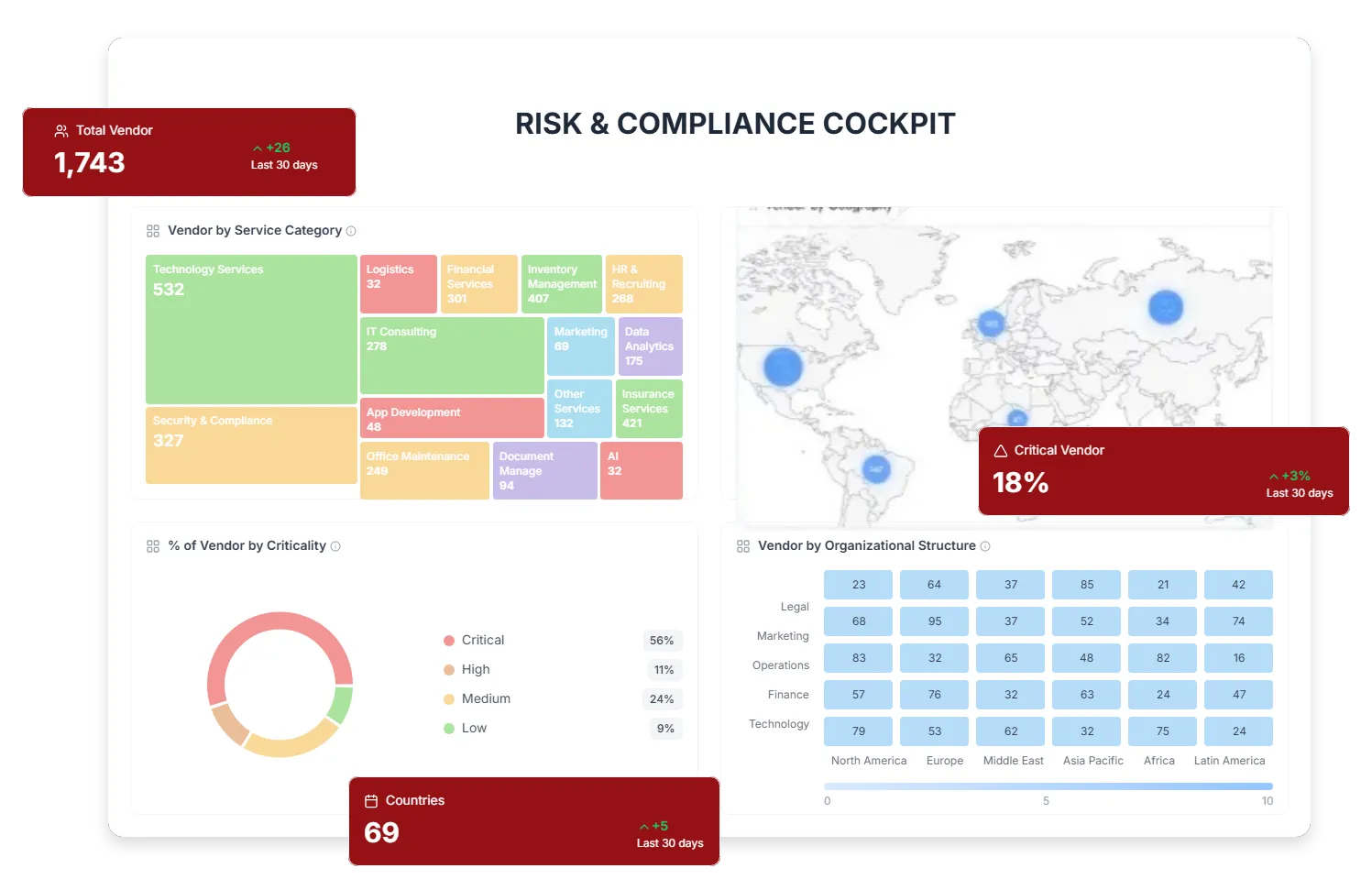
ERD-Live-Portfolio-Summary-Metrics

Live Portfolio Summary Metrics

ComplyScore® provides real-time visibility into vendor risk posture across your entire portfolio.

  • Displays total vendor count, active assessments, findings, remediation tasks, and overall risk scores
  • Tracks total engagements with up-to-date portfolio health indicators
  • Visualizes risk distribution across high, medium, and low-risk vendors with percentage breakdowns
Selection (59)

Click-Through Access to Supporting Evidence

ComplyScore® lets users drill directly from dashboard metrics into the data and evidence behind every risk signal.

  • Links overdue remediation metrics to aging tasks, owners, and timelines
  • Provides direct access to vendor risk scores, findings, and recent monitoring alerts
  • Enables review of assessment progress, questionnaire completion, and pending evidence uploads

What Executive Risk Dashboards Unlock

Intervene During the Cycle, Not After

Leadership sees bottlenecks while work is in progress. If assessments stall or remediation tasks age past SLAs, the dashboard highlights these immediately. Teams address issues before they become audit findings or risk committee surprises. 

Focused Oversight on What Matters Most

Dashboards surface high-risk vendors, top-risk engagements, and monitoring remediation tasks requiring immediate attention. Leaders don't wade through comprehensive vendor lists to find where to focus. The system prioritizes based on risk scores, task status, and target dates. 

Configurable Views for Different Audiences

Time filters let users switch between last 7 days, last 30 days, or custom date ranges. Widget layouts adjust based on role, so analysts see operational details while executives see strategic summaries. Dashboard configurations save per user so teams maintain consistent views across sessions. 

Complete Traceability from KPI to Evidence

When leadership questions a metric during board meetings, click through to see the specific assessments, findings, or monitoring alerts driving that number. No more post-meeting research to explain dashboard figures. Evidence links directly from every data point. 

Integrate With Your Existing Systems

Connect to GRC Platforms


ComplyScore® dashboards integrate with ServiceNow, Archer, and LogicGate, giving risk teams and leadership visibility within existing GRC environments.


Extend to BI and Analytics Tools


Sync dashboard data to Power BI and Tableau to support advanced analytics and executive-level reporting.

Sync Metrics Across Systems


Risk metrics flow automatically into enterprise dashboards, allowing vendor risk insights to sit alongside operational and business KPIs for consolidated reporting.


Audit-Ready Remediation Management

ComplyScore® documents dashboard metrics in a way that meets audit, regulatory, and governance expectations, with clear traceability behind every reported number.


Map Once. Comply Everywhere.

  • Security standards: Support ISO 27001 and SOC 2 continuous control monitoring with auditable dashboard metrics and refresh history.

  • Third-party oversight mandates: Meet DORA and SAMA requirements with documented, regulator-ready views of ongoing vendor risk posture.

  • Board governance reporting: Align dashboards to executive and board-level risk reporting standards with consistent, defensible metrics.

  • Full metric traceability: Every dashboard metric includes data sources, calculation methods, refresh timestamps, and exportable point-in-time snapshots for regulatory reporting.

quote

Atlas far exceeds our requirements...

One of the key differentiators between Atlas and other governance, risk and compliance and 3rd party risk management tools is the ease of use of the Atlas solutions. Also from a total cost of ownership perspective, Atlas far exceeds those requirements in terms of being very cost efficient in delivering all this.

Izhar Mujaddidi,

Senior Director, Cybersecurity, Carelon Behavioral Health ​

quote

ComplyScore is highly responsive and adaptable

ComplyScore is highly responsive and adaptable to our evolving processes and requirements, proving to be a trusted partner at every step. Their security analysts were knowledgeable, flexible, and delivered exceptional services that consistently exceeded our expectations.

Enterprise Client

G2 Review (Jan 2025)

quote

My experience has been largely positive

I have been using ComplyScore for several months and my experience has been largely positive. The platform provides comprehensive solutions for compliance management and streamlines our operations efficiently.

Mid-Market Company,​

Gartner Peer Insights (Sep 2024)

Frequently Asked Questions

Can we customize which widgets appear for different roles?

Yes. Configure dashboard layouts during setup to show role-appropriate widgets. Risk analysts see detailed task queues and assessment progress. Executives see portfolio summaries and high-risk vendor lists. Each user maintains their own view preferences. 

How often do dashboard metrics refresh?

Dashboards update in real time as underlying data changes. When teams complete assessments, resolve remediation tasks, or monitoring alerts arrive, metrics reflect these immediately. No scheduled refresh cycles or manual exports required. 

Can we export dashboard data for board presentations?

Yes. Export current dashboard views as PDF reports or Excel files with timestamp documentation. Scheduled exports can generate weekly or monthly summaries automatically. All exports include data source attribution for audit purposes. 

Do drill-through links work for all metrics?

Yes. Click any dashboard metric to access underlying details. Vendor counts link to vendor lists with filters applied. Risk scores link to assessment summaries. Remediation counts link to task queues showing owners and due dates.