

.png?width=200&height=45&name=ComplyScore%20Logo%20Transparent%20(1).png)


.webp?width=869&height=597&name=image%20(5).webp)


-1.png?width=486&height=315&name=IDC%20Banner%20(1)-1.png)



.png?width=300&height=175&name=Rectangle%2034624433%20(2).png)


.webp?width=1280&height=720&name=Medtech%20Breakthrough%20Award%20Winner%20(1).webp)









It-infrastructure
ComplyScore® Launches World’s First Headless TPRM, Bringing Conversational AI to Compliance Management. 
ComplyScore® Launches World’s First Headless TPRM, Bringing Conversational AI to Compliance Management.


Optimize and secure provider data

Streamline provider-payer interactions

Verify real-time provider data

Verify provider data, ensure compliance

Create accurate, printable directories
Reduce patient wait times efficiently.

You rely on software every day — for work, communication, infrastructure, and more. Some of it is open-source, such as WordPress or Kubernetes. Others, such as Microsoft Office or Salesforce, run on closed-source code that you cannot view or modify.
Knowing how these two models work helps you ask better questions: Who controls the code? Can it be adapted? What kind of support is available? These are not minor details; they affect how software fits into your systems, how secure it is, and how much flexibility you really have.
As you explore the differences, you will start to see where each model fits best. Some teams need the transparency of Open-source. Others need the structure and control that closed platforms offer.
%201.webp?width=828&height=644&name=Understanding%20Open-Source%20Software%20-%20visual%20selection%20(1)%201.webp)
Open-source software gives you access to the code, not just to run it, but to read it, change it, and share it. Licenses like MIT or GPL make this possible by setting clear rules about what you are allowed to do.
You are not limited to just using the software. If you spot a bug, need a new feature, or want to adjust how something works, you can jump in and make changes. That flexibility is one reason why tools like Linux, PostgreSQL, and Apache are used by teams around the world, from startups to cloud platforms.
Some open-source projects are run entirely by volunteers. Others have backing from companies that offer managed support, premium features, or enterprise versions. Either way, no single vendor is controlling how the software evolves.
In most cases, open-source means:
The real value comes from visibility. When something breaks, you can troubleshoot it yourself or work with others who have already solved it. That kind of transparency is hard to get with closed systems.
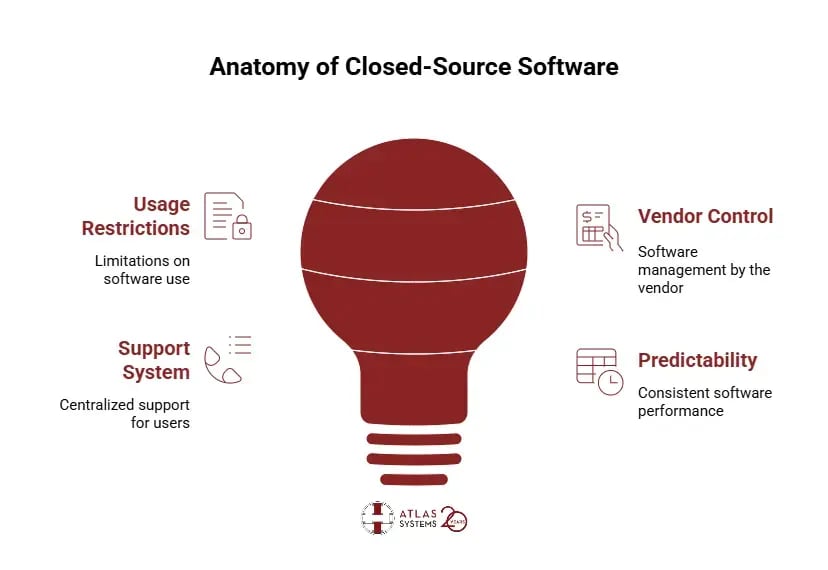
Closed-source software does not show you what is under the hood. You can use it, install it, log in, and get things done, but the code stays locked. If something breaks, you wait. You do not get to poke around or patch it yourself.
Everything runs on the vendor’s terms. Updates arrive when they push them. Licenses define what you can and cannot do, how many devices, which users, and where it runs. You agree, or you walk away.
This setup is common in the tools you probably use every day. Think Photoshop, iOS, Excel. They work. They are familiar. And if you hit a wall, you file a support ticket and hope the fix is in the next release.
What stands out in this model:
For some teams, that predictability is the point. You trade flexibility for consistency and hand over control in exchange for a polished product.
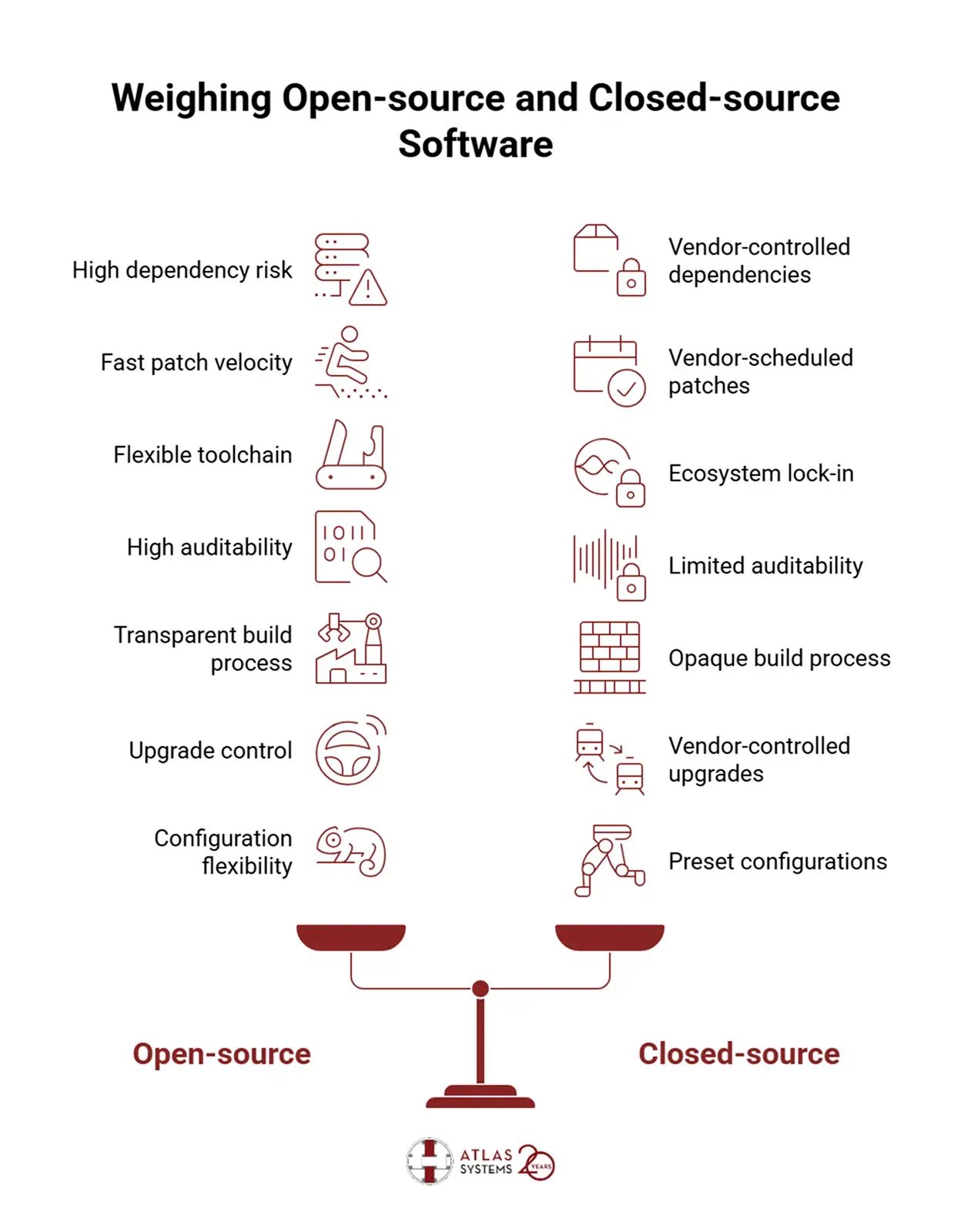
Open and closed-source software may serve similar goals, but they work very differently behind the scenes. These differences affect how teams manage dependencies, respond to issues, and build or scale their systems.
Open-source:
Open-source projects often pull in a large number of external packages, many of which are added automatically when you install something. Some of these are known as transitive dependencies, components that your software did not directly choose but still depends on. This can lead to licensing problems, outdated code, or hard-to-find bugs.
Closed-source:
Closed-source software does not usually expose this kind of dependency chain. The vendor controls what gets included, but since the inner workings are hidden, you may never know what libraries are inside unless the vendor shares that information in a Software Bill of Materials (SBOM).
Open-source:
Fixes in Open-source projects can be fast, especially if the community is active. But even if a patch is available, it is up to your team to decide how and when to apply it. If the project is not well-maintained, updates might stop altogether.
Closed-source:
Closed-source products follow the vendor’s schedule. Sometimes that means you need to wait longer for fixes, even for critical issues. On the other hand, some vendors offer faster patches if you are on a premium support plan. Either way, control of the fix is not in your hands.
Open-source:
Open-source tools usually work with open standards, so it is easier to replace one tool with another. You are not locked into a single vendor’s stack if something no longer fits.
Closed-source:
Closed systems tend to keep everything inside their ecosystem. That can make life easier when everything works well together, but harder if you want to switch parts out later. Custom APIs or formats can make migration more complicated than expected.
Open-source:
When something goes wrong in open-source, you can dig through the code yourself or get help from someone who can. It is possible to verify what the software does and why.
Closed-source:
With closed-source, you are limited to what the vendor provides. If you need to trace a bug or check compliance, you might not get full access to the logs or internal behavior. Support may help, but it depends on what the vendor is willing to share.
Open-source:
In open-source, you can look at the code, see how it is built, and verify whether it follows your organization’s policies. Some projects also support reproducible builds, which help confirm that no changes were made before release.
Closed-source:
Closed software does not show how the final product was put together. You have to trust that the vendor followed secure practices and included all necessary patches before release. If that level of transparency is required, it may not be enough.
Open-source:
Open-source projects often release new versions frequently. Sometimes those updates include changes that are not backward compatible. You can choose to upgrade, delay, or even maintain a fork, but each option comes with extra work.
Closed-source:
Closed-source vendors usually aim for stability and backwards compatibility. You may not have much choice in how or when to upgrade, especially if the product is subscription-based, but updates are more likely to avoid breaking your existing setup.
Open-source:
With Open-source, the performance you get depends on your configuration and tuning. There is flexibility, but you may need to do some extra work to get everything running smoothly at scale.
Closed-source:
Closed systems often come with presets tuned for common use cases. That makes them easier to set up, but harder to tweak if your environment has special requirements.
Most teams do not use open-source or closed-source. They mix both depending on what fits best.
Take Android, for example. The core system is open-source, which allows manufacturers and developers to build on top of it. But parts like Google Play and some APIs are closed-source and only available through licenses.
ElasticSearch started as open-source. Later, its license changed to limit commercial use. Amazon responded by creating OpenSearch, a fully open alternative. This shows how open and closed strategies often overlap or evolve.
In practice, you probably already rely on both. What matters most is knowing where each model fits and how to manage it properly, especially when security, support, and compliance are on the line.
Open-source tools are often seen as community-driven experiments, but some projects are built with scale, performance, and long-term growth in mind. TiDB is a good example of how an Open-source approach can support both rapid development and enterprise-grade operations.
TiDB, developed by PingCAP, is a distributed SQL database designed for hybrid transactional and analytical workloads. It was originally built to bridge the gap between MySQL's simplicity and the scalability of NoSQL systems. Over time, it has evolved through community input, open contributions, and transparent iteration cycles.
Teams adopting TiDB get more than just access to source code—they gain control over how the software is deployed, extended, and integrated into their environment.
Here are a few reasons TiDB stands out:
For companies that need additional guarantees, PingCAP offers enterprise-grade support, managed deployments, and enhanced monitoring features. That combination—open access with optional commercial backing—gives teams the freedom to experiment while still meeting production demands.
TiDB shows that Open-source is not limited to developer tools or side projects. With the right model, it can deliver the reliability and performance that complex systems require, without closing off visibility or control.
The conversation around open vs closed-source plays out differently in the world of AI. Here, the divide affects not just access to code, but trust, explainability, and how innovation moves forward.
Take two examples:
Why does this matter?
.webp?width=1248&height=1096&name=_-%20visual%20selection%20(3).webp)
Many AI startups are now using hybrid strategies. Some train models in the open, then deploy them behind a paywall. Others expose core models freely but charge for hosted infrastructure and performance tuning.
If your organization is evaluating AI tools, the same tradeoffs apply: visibility vs. control, cost vs. compliance, flexibility vs. stability. The difference is that, in AI, the consequences often go far beyond software architecture; they touch ethics, governance, and data privacy too.
Many applications today blur the lines between open and closed-source. Just because a tool is proprietary does not mean it was built from scratch. In most cases, it is the opposite.
A closed-source product may contain dozens of open-source components under the hood. These could be libraries for encryption, image processing, data handling, or machine learning. What makes the overall product closed is that the source code for the combined application is not shared, even though it depends on open building blocks.
ElasticSearch started as an Open-source search engine. As commercial use expanded, Elastic changed its license to restrict how others could host or sell the software. This prompted Amazon to fork the project into OpenSearch—a version that preserved open licensing. Both tools still share some common code ancestry, but their models are now clearly distinct.
If your team uses closed software that includes Open-source, you are still responsible for license compliance. You need to know:
This is why tools that generate a Software Bill of Materials (SBOM) are becoming standard. They help you track what is inside the software stack, even if that software comes from a vendor.
Choosing between Open-source and closed-source is rarely a binary decision. Both models bring their strengths and their obligations. What matters more is how you evaluate each tool in the context of what your team needs.
If you need full visibility into how something works or want the freedom to modify it to fit your infrastructure, open-source can give you that flexibility. It may also help you reduce licensing costs and avoid vendor lock-in. But the tradeoff is accountability. You need a process for tracking dependencies, understanding licenses, and keeping everything patched.
Closed-source makes sense when stability, support, and compliance are non-negotiable. If your business runs on tools that must meet strict SLA requirements or handle sensitive data under audit, vendor-backed software often brings peace of mind. You give up some control, but in return, you gain predictable performance and structured support.
Many modern environments do not choose one or the other—they combine both. The real decision is how you balance openness and control in a way that fits your technical goals and risk tolerance.
Closed software may use open-source libraries but keeps its own code private. You must still comply with open-source license terms when used this way.
It affects control, customization, licensing, and how your software evolves. Security, compliance, and cost structures vary widely between models.
Not always, security depends on updates and visibility, not license type. Open-source allows peer review; closed-source relies on vendor trust.
Untracked components can lead to license conflicts or outdated code. Risks are avoidable with SBOMs, internal policies, and monitoring tools.

%20(1).jpg)