








.webp?width=387&height=387&name=Medtech%20Breakthrough%20Award%20Winner%20(1).webp)



























Provider Lifecycle Management


TL;DR
- Enrollment enables billing: Payer enrollment officially connects providers to insurance networks for claims processing and differs from credentialing which only confirms qualifications, both required for reimbursement
- Seven critical documents: NPIs (individual/group), W-9 tax forms, current state licenses, malpractice insurance coverage, practice details, hospital admitting privileges, CAQH profile must be accurate
- Enrollment type variations: Medicare uses PECOS portal, Medicaid varies by state, commercial insurers require credentialing first, Tricare serves military families, VA Community Care has federal requirements
- Best practices prevent delays: Maintain centralized document library, standardize information across all systems, assign dedicated point person, use payer-specific checklists, schedule regular compliance audits
Summarize This Article With
Getting paid on time, staying compliant, and being listed correctly in provider directories are the core priorities for healthcare providers. At the center of all three is one process many teams underestimate: payer enrollment.
Payer enrollment is a critical step in the healthcare revenue cycle. It allows providers to bill insurance companies and receive reimbursements for the care they deliver. It’s how they officially join a payer’s network. Despite its importance, the process is often delayed, mismanaged, or bogged down by errors. That leads to denied claims, revenue loss, and frustrated patients.
This guide is for healthcare providers and operations teams who want a clear, practical understanding of payer enrollment. We will walk through what it is, why it matters, what it requires, and how to get it right from the start.
What is Payer Enrollment?
Payer enrollment is the step that allows you to officially join an insurance network and start billing for the care you provide. Without it, insurance claims won’t be processed, and you will remain invisible in payer directories.
Many providers mistake payer enrollment for credentialing. The two work together, but they are not interchangeable. Credentialing confirms your qualifications. Enrollment is what connects those qualifications to a payer’s system so you can move forward with billing.
Why does payer enrollment matter to your practice?
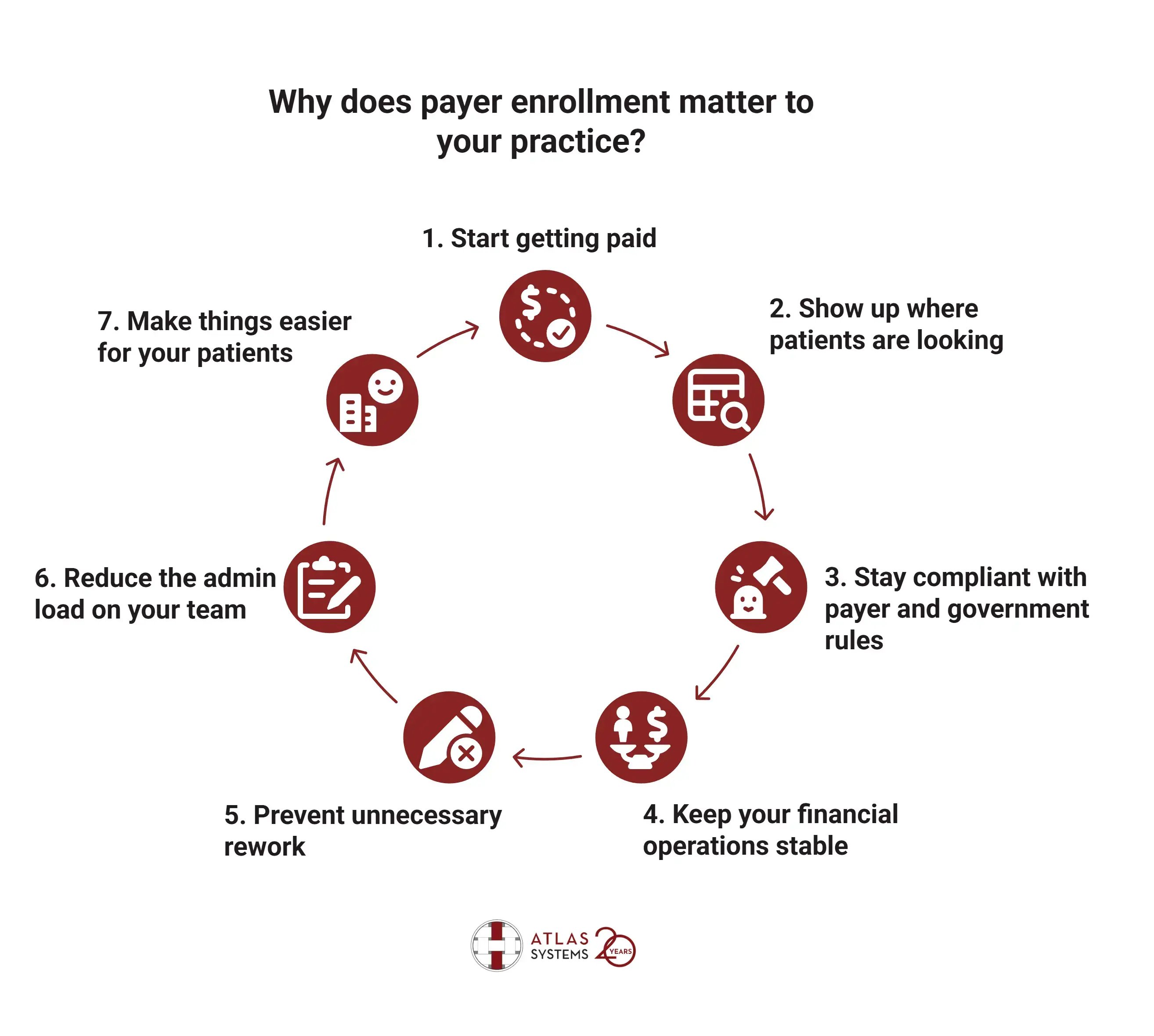
1. Start getting paid
You won’t receive payment from payers until your enrollment is approved. Even if services have already been delivered, claims are likely to be denied if this step is skipped or delayed. Taking the time to start early and stay organized helps prevent cash flow issues.
2. Show up where patients are looking
Most patients use their insurance provider’s directory to choose where they will book appointments. If your information is not in that system, they will not see you as an option. So, being properly enrolled keeps your practice visible to the people looking for care.
3. Stay compliant with payer and government rules
Payers and government programs have strict expectations about the accuracy of provider listings. Regulations like the No Surprises Act hold both parties accountable when information is missing or wrong. Staying current with your enrollment details reduces the risk of penalties and keeps your billing from getting flagged.
4. Keep your financial operations stable
When you are bringing on new providers or opening new locations, delays in enrollment can affect your ability to bill. That disrupts your revenue cycle and makes it harder to manage payroll, forecasting, or staffing plans. So, aligning your enrollment steps with your business timeline helps you avoid these gaps.
5. Prevent unnecessary rework
Submitting claims before enrollment almost always leads to denials. Then comes the extra work: tracking down the issue, correcting it, and resubmitting the claim. A clean enrollment process at the start keeps your billing staff from chasing problems later.
6. Reduce the admin load on your team
Incomplete paperwork, inconsistent data, or missing signatures can slow down everything. A structured workflow for enrollment makes the process easier to manage, especially if you work with multiple payers or operate across different locations.
7. Make things easier for your patients
Your patients expect their visits to be covered. If enrollment delays cause directory errors, coverage might not apply—triggering surprise bills. The No Surprises Act provider directory rules protect against this by mandating accurate network listings post-enrollment. Taking care of enrollment upfront helps prevent confusion and builds trust during scheduling and billing.
Common Documents and Information Required for Payer Enrollment
Every payer asks for different things, but most applications ask for a familiar set of information. You will move through enrollment faster if you gather it all before you begin. Here’s what you should have ready.
1. Personal details
Start with your full legal name, date of birth, and Social Security Number. Include your direct contact information: email, phone number, and the physical address where you see patients. If you are part of a group, include the group’s identifying details as well.
2. National Provider Identifiers (NPIs)
You will need both your individual and group NPI numbers. Double-check that these match other documents you plan to submit. Mismatches, even small ones, can stall your application.
3. Tax and legal information
Attach a signed and dated W-9 form. Make sure it reflects your legal business name and Tax ID Number (TIN) or Employer Identification Number (EIN). This form is used to verify the entity that will receive payment.
4. Licenses and certifications
Submit your active medical license for the state where you practice. If you are board-certified in any specialty, include documentation. For providers who prescribe, include your DEA certificate. If you were trained internationally, include an ECFMG certificate.
5. Practice setup
List your practice’s legal name, office address, billing address, and general contact numbers. If you operate from more than one location, include each one. Be clear about how your practice is structured if you share space or resources with other providers.
6. Liability coverage
Attach proof of your current malpractice insurance. Include the policy number, coverage limits, and expiration date. This form must be current. Expired or missing insurance certificates are a common reason for delays.
7. Hospital relationships
List any hospitals where you have admitting privileges. Include the facility name, department, and contact information. If you don’t have admitting privileges, name a backup physician who does.
8. Employment background
Some payers want to see where you’ve worked in the last five years. Prepare a basic timeline of your employment history with practice names, roles, and dates. Include professional references if requested.
9. Training and education
Have copies of your medical school diploma, residency or fellowship certificates, and other training documentation ready. Some payers ask for records showing you have met continuing education requirements.
10. Ownership details
If you own part of your practice, disclose your ownership percentage. For group practices, list each owner and their share. Include identifying details such as full names and Tax ID Numbers.
11. Payment setup
To receive electronic payments, provide your account and routing numbers on a voided check or a signed letter from your bank. This lets the payer deposit reimbursements directly into your account.
12. CAQH profile (if used)
Many commercial insurers pull your data from CAQH. If you have a profile there, make sure it is up to date and all your uploaded documents are correct. Give payers access so they can view your profile without delay.
Before you hit submit, go back and double-check each document. Look for expired licenses, typos in addresses, unsigned forms, or anything else that could cause problems later.
Organize your paperwork the same way every time. Using a checklist specific to each payer makes it easier to catch what’s missing. It also shortens the time between submitting your application and receiving approval.
Once providers are enrolled, keeping their panel data accurate falls to the payer's provider roster management software, which tracks every roster change that happens after enrollment is complete.
Types of Payer Enrollments
Payer enrollment is not handled the same way across all plans. Requirements and timelines vary depending on whether you are working with a federal program, commercial insurer, or telehealth service. So, understanding how each type works helps you prepare, reduce delays, and avoid denied claims.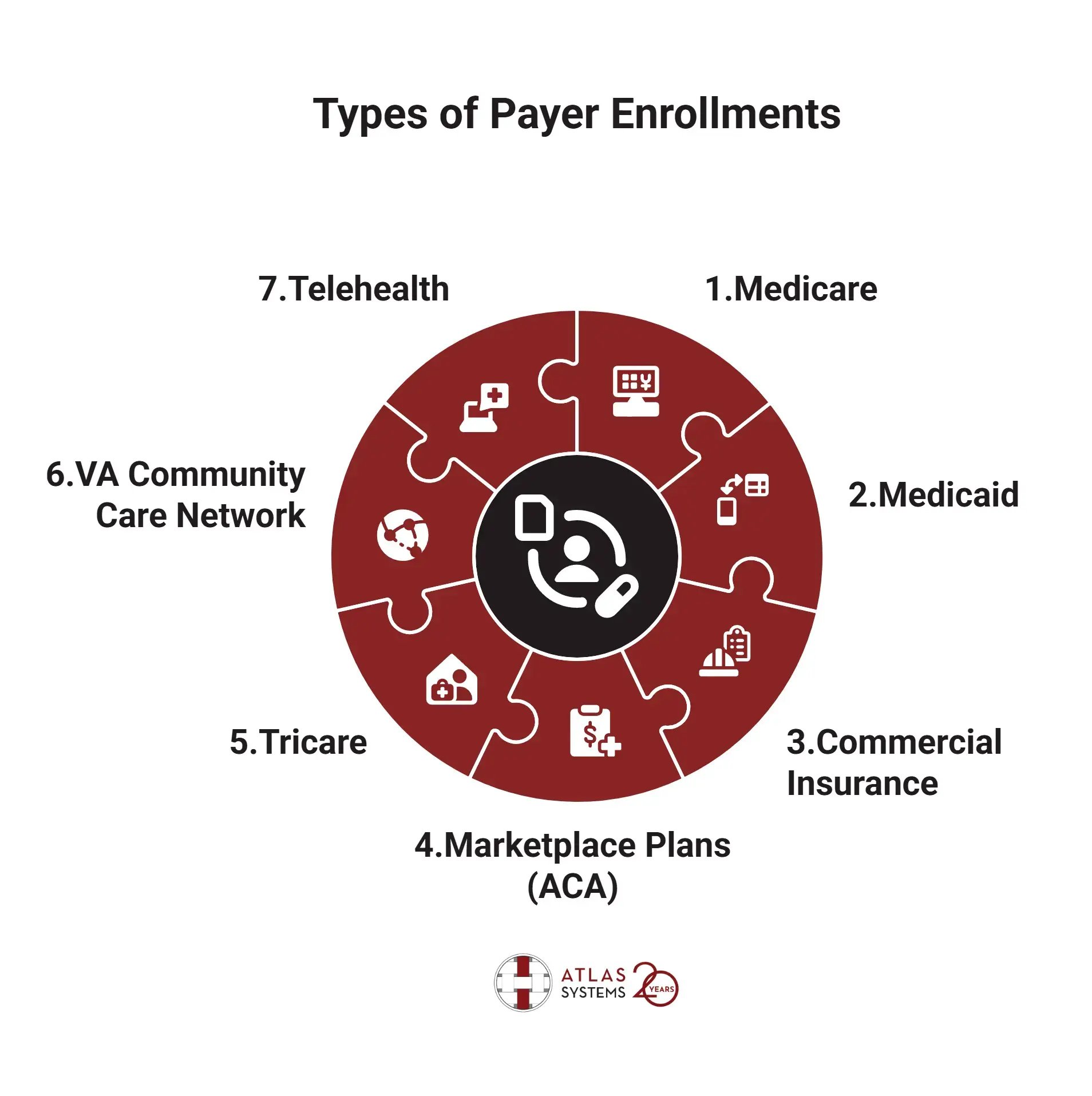
1. Medicare
Medicare uses an online platform called PECOS to manage enrollments. When applying, you will submit ownership details, practice locations, identity verification, and direct deposit setup. Everything must be accurate. Incomplete or mismatched data is a common reason for delays. While Medicare lets you bill up to 30 days retroactively, claims will not be processed until your enrollment is approved.
2. Medicaid
Medicaid is state-run, which means every state sets its own process. Some use web portals; others still rely on paper forms. You will need to gather the same core documents used in most applications like licenses, malpractice coverage, and practice details, but some states add extra steps like fingerprinting or background checks. If you plan to treat patients across multiple states, be ready to complete a new application for each one.
3. Commercial insurance
Working with insurers like Aetna, Cigna, or Blue Cross Blue Shield often involves credentialing first, then contracting. Some payers pull your data from CAQH, while others want you to use their own portals. After credentialing, you will review a contract that covers fees and participation rules. Many commercial plans do not allow retroactive billing, so wait for written approval before you start seeing patients.
4. Marketplace plans (ACA)
Plans listed through the Health Insurance Marketplace require you to meet both federal and insurer-specific criteria. They often involve working with major carriers under ACA rules. Some of these enrollments come with strict submission windows tied to certification periods. Mark your calendar early so you don’t miss them.
5. Tricare
Tricare serves active-duty military families. Enrollment is handled by contractors assigned to different regions. You will submit documents similar to those required by Medicare, with added steps for identity verification and service commitments. Double-check which contractor oversees your area before starting the application.
6. VA community care network
To treat veterans outside of VA facilities, you will need to enroll through the VA’s Community Care Network. The VA works with third-party administrators like TriWest or Optum to onboard non-VA providers. Enrollment includes credentialing, contracts, and provider training. You will need to meet federal requirements and follow their documentation standards closely.
7. Telehealth
Some payers treat telehealth as a separate service line. You might need to submit a new enrollment even if you’re already credentialed for in-person care. Be clear about where you're licensed to practice and what kind of services you offer. Some insurers differentiate between live video and asynchronous models, so flag the right modality on your application.
Different payers follow different rules. Some rely on shared systems like CAQH or PECOS. Others operate their own portals. A few allow backdated claims, but most require full approval before you can begin billing. Knowing the structure behind each enrollment type helps you prepare smarter and move faster through the process.
Step-by-Step Payer Enrollment Process
Managing payer enrollment requires planning and attention to detail. Each task in the process contributes to how quickly you can start billing and receiving payments. Here is a direct look at how to move through each step without unnecessary delays.
Step 1: List your payer targets
Start by identifying which insurance companies you want to enroll with. Include Medicare, state-specific Medicaid programs, commercial insurers, and any plans that support your telehealth services. Sorting these out first helps you avoid scrambling later.
Step 2: Gather all enrollment documents
Pull together the documents you will need for each application. These usually include your NPI, state medical license, malpractice insurance, tax details, and practice ownership information. Make sure everything is current and matches across your files.
Step 3: Register on payer systems
Some payers use national systems like PECOS or CAQH. Others direct you to their own portals. Set up your access early so you do not lose time later waiting for login credentials or email confirmations.
Step 4: Complete credentialing forms
Before enrollment is approved, many payers require you to complete a credentialing step. Fill in all requested fields, upload clear documents, and verify that names, addresses, and dates are consistent with your other materials. This is one of the most common points where errors cause delays.
Step 5: Submit your applications
Follow each payer’s format exactly. Some accept only digital submissions, while others still rely on printed forms. Double-check that you have included all attachments and signed every page that requires it. Incomplete applications may be returned without review.
Step 6: Track your application progress
Do not assume everything is moving forward once you submit. Log in to the payer portal or call the provider support line to check status updates. If something is flagged or needs correction, responding quickly keeps your timeline intact.
Step 7: Finalize your contracts
Once your enrollment is approved, the payer will send a contract outlining their participation terms. Review the document closely. Confirm that service codes, payment schedules, and effective dates match what you expect. Do not schedule appointments under a plan until this is confirmed.
Step 8: Enter payer information into your systems
Once your payer enrollment is active, update your EHR or billing platform. Add details like payer ID, start date, and contact information. This ensures that claims are routed properly and reduces rejections.
Step 9: Verify your directory listing
Check that your practice shows up correctly in online provider directories. Include your name, specialty, office location, and contact information. If something is missing or incorrect, reach out to the payer to fix it.
Step 10: Set reminders for re-enrollment
Enrollment approvals do not last forever. Many payers require you to revalidate every few years. Track when each approval expires so you can renew in time and avoid a break in participation.
Manual enrollment breaks down once a provider group operates across multiple states and payers. Payer enrollment software automates application generation, submission tracking, and revalidation across every payer relationship from one centralized dashboard.
Best Practices for Successful Payer Enrollment
A successful payer enrollment process depends on how well you prepare and manage each stage. Mistakes are avoidable if you follow consistent routines, use reliable data, and stay proactive. The goal is to keep your enrollment moving forward without disruption.
Here are practical best practices that support a smooth payer enrollment experience.
Keep a master document library
Organize your core documents in a central location. Store updated copies of your state license, malpractice insurance, W-9, NPI confirmation, and ownership details. When these are current and accessible, it is easier to respond to payer requests without delay.
Standardize information across systems
Inconsistencies between your credentialing forms, CAQH profile, and enrollment applications are a common cause of rejections. Before you submit anything, verify that all information—addresses, phone numbers, tax IDs, and legal names—matches exactly. Standardizing these details also simplifies future updates and revalidations.
Assign a point person
Designate one team member to manage enrollment activities. This person should track timelines, communicate with payers, and collect necessary documents. A clear point of contact avoids duplication and missed deadlines, especially if you are enrolling multiple providers.
Use checklists tailored to each payer
Each payer has different requirements. Instead of relying on memory or copying forms from other plans, create individual checklists that reflect what each payer expects. This helps reduce the risk of missing a document or submitting outdated information.
Maintain an enrollment tracker
Track every application with key dates: submission, follow-up, approval, and expiration. Use a simple spreadsheet or project management tool to monitor status by payer. Visibility into what is pending and what is complete keeps your process from stalling.
Schedule regular audits
Check your submitted applications and directory listings at regular intervals. Look for expired licenses, incorrect addresses, or outdated practice names. Payers may not notify you of small inconsistencies until they cause a claim rejection or participation issue.
Confirm every submission
After you submit an application, confirm that it was received. Save confirmation numbers or screen captures from payer portals. If a problem arises, having proof of submission can help resolve the issue faster.
Do not wait for payers to follow up
Enrollment departments handle a high volume of requests. If you do not hear back within the expected timeframe, reach out. A short email or phone call can uncover problems early and prevent extended delays.
Review contracts carefully before signing
Once approved, you may receive contracts outlining rates, obligations, and participation terms. Review these with your legal or billing team. Make sure reimbursement rates and service coverage align with your expectations before you return the signed agreement.
Document everything
Keep a log of your communications with payer representatives, including names, dates, and topics discussed. Document when and where you submitted each application. This information is valuable if you need to troubleshoot a delay or dispute an enrollment denial.
Prepare for revalidations
Some payers require periodic re-enrollment or data revalidation. Set calendar reminders for these deadlines. Renew documents like malpractice insurance and licenses before they expire so your enrollment remains uninterrupted.
Monitor provider directory accuracy
After enrollment is confirmed, verify that your practice details appear correctly in each payer’s directory. If patients cannot find you or see incorrect data, it may affect referrals or network compliance.
Payer enrollment works best when you treat it as an ongoing administrative function, not a one-time project. Building habits around standardization, tracking, and communication helps you reduce errors and maintain payer relationships over time.
Challenges in Payer Enrollment & How to Overcome Them
Delays in the payer enrollment process often start with small missteps. A missing signature, inconsistent information, or lack of follow-up can prevent your application from moving forward. These issues disrupt billing timelines, limit patient access, and create unnecessary administrative work.

To avoid common setbacks, you need to know where problems occur and how to address them early.
When payers do not respond
Some payers take longer than expected to process applications. Without confirmation, it is difficult to know if your submission is under review or waiting in a queue.
What you can do: Reach out after a reasonable period, using the contact options listed on the payer portal. Keep a record of each follow-up, including dates and reference numbers.
Application errors that trigger rejection
If your submission contains conflicting details, expired licenses, or incomplete fields, the payer may reject it or place it on hold.
What you can do: Review every section before submitting. Confirm that tax ID numbers, addresses, and license dates match across all documents. Use a checklist that mirrors the payer’s specific requirements.
Missteps in credentialing and enrollment timing
Some plans require credentialing to be completed before they will review your enrollment. If these steps overlap or occur out of order, the entire process slows down.
What you can do: Map out each payer’s process ahead of time. Start credentialing early and track its progress separately from your enrollment timeline.
Submissions that cannot be tracked
Older portals or fax-based applications may not confirm receipt. If your file is lost and no confirmation is received, you may not realize it for weeks.
What you can do: Use platforms that offer submission receipts. Take screenshots or save confirmation emails for reference. Log each submission in your tracking tool.
Gaps in staff oversight
If staff changes occur during enrollment, files can be misplaced or overlooked. Tasks may stall without clear ownership.
What you can do: Assign every payer enrollment case to a specific team member. Make shared folders accessible so that others can assist or pick up where someone left off.
Errors in directory listings
After enrollment is approved, some practices find that their information is listed incorrectly in provider directories. Inaccurate listings affect patient referrals and online search results.
What you can do: Visit each payer’s provider directory after approval. Confirm that your name, address, and specialty are correct. Submit correction requests as needed and follow up until changes appear.
Missed revalidation deadlines
Payer enrollment is not a one-time event. Many payers require you to re-enroll on a regular schedule. Missing a deadline can result in deactivation.
What you can do: Add revalidation deadlines to your calendar. Set reminders ahead of expiration dates for licenses and insurance coverage. Keep renewal documents prepared in advance.
Manual processes that slow progress
Using paper forms or tracking everything by spreadsheet creates delays and increases the risk of oversight. This is especially true when handling multiple providers or states.
What you can do: Use a centralized system for tracking payer enrollment tasks. Automate reminders and make updates visible to your full team.
Fix Enrollment Gaps Before They Impact Revenue: How Atlas Systems Helps You Stay Ahead
Payer enrollment is a core part of keeping your revenue cycle intact and your provider listings accurate. Delays in enrollment can block reimbursements, lead to errors in directories, and create problems with patient access and scheduling.
To avoid these issues, healthcare teams need a system that goes beyond manual checklists and spreadsheets. You need visibility into every application, real-time tracking, and tools to flag missing or outdated information before it becomes a problem.
Atlas Systems offers a direct solution through PRIME®, a platform built for healthcare organizations managing the payer enrollment process at scale. PRIME® helps your team:
- Validate provider data automatically
- Track enrollment timelines across all payers and locations
- Identify credentialing issues before they disrupt billing
- Stay ahead of revalidations with system-generated alerts
If your organization is onboarding new providers, expanding across states, or handling high application volumes, PRIME® centralizes enrollment activity to reduce risk and avoid delays. It simplifies document management, speeds up approvals, and ensures that every step is logged and auditable.
With Atlas Systems, your team can manage the full payer enrollment process with fewer errors and faster turnaround times. That means fewer claim denials, better payer compliance, and stronger provider network performance.
To find out how Atlas Systems can support your payer enrollment strategy, reach out to our team or book a demo for a personalized walkthrough.
FAQs
1. How long does it typically take to complete payer enrollment?
Timelines vary by payer, but most commercial and government plans take between 60 to 120 days to process an enrollment application. Delays can occur if documents are missing or need corrections. Staying organized and following up regularly can help keep the payer enrollment process moving.
2. Can I start billing insurance companies before completing payer enrollment?
No. Most insurance companies require providers to be fully enrolled and approved before they can submit claims. Submitting claims too early often results in denials. Medicare may allow back-billing up to 30 days before the enrollment effective date.
3. Do I need to complete payer enrollment for Medicare and Medicaid separately?
Yes. Medicare and Medicaid follow separate regulations and require individual applications. Each state has its own Medicaid enrollment process, so you must apply based on the locations where you provide care.
4. Can a third-party service help with payer enrollment?
Yes. Many healthcare organizations rely on external partners to manage the payer enrollment process. Atlas Systems' PRIME® platform helps automate credential tracking, document collection, and status monitoring to reduce errors and shorten approval timelines.
5. Is payer enrollment required for telehealth providers?
Yes. If you offer telehealth services and want to bill insurance, you must go through the payer enrollment process like any in-person provider. Make sure to indicate telehealth as a service type and verify each payer’s telehealth policy.
6. How can I check the status of my payer enrollment with a specific insurance company?
Most payers have provider portals or phone support for tracking application status. If you use a centralized platform like PRIME®, you can monitor progress across all applications in one place and receive real-time alerts about delays or missing data.
7. How do I handle payer enrollment if I work with multiple clearinghouses?
Coordinate with each clearinghouse to understand how claims are routed. Ensure your payer enrollment aligns with their requirements. Using tools that consolidate provider data can help prevent errors and keep submission workflows efficient.

%20(1).jpg)

Related Reading


Provider Lifecycle Management
Best Provider Network Management Platforms for Payers and Providers in 2026
Read the blog →
Provider Lifecycle Management
Best Provider Directory Validation Companies for Health Plans in 2026
Read the blog →

Provider Lifecycle Management
CMS Regulations for Behavioral Health Providers: A Compliance Breakdown
Read the blog →
Provider Lifecycle Management