

.png?width=200&height=45&name=ComplyScore%20Logo%20Transparent%20(1).png)


.webp?width=869&height=597&name=image%20(5).webp)


-1.png?width=486&height=315&name=IDC%20Banner%20(1)-1.png)



.png?width=300&height=175&name=Rectangle%2034624433%20(2).png)


.webp?width=1280&height=720&name=Medtech%20Breakthrough%20Award%20Winner%20(1).webp)










It-infrastructure
ComplyScore® Launches World’s First Headless TPRM, Bringing Conversational AI to Compliance Management. 
ComplyScore® Launches World’s First Headless TPRM, Bringing Conversational AI to Compliance Management.


Optimize and secure provider data

Streamline provider-payer interactions

Verify real-time provider data

Verify provider data, ensure compliance

Create accurate, printable directories
Reduce patient wait times efficiently.

NOC monitoring plays a key role in how you keep your network stable, especially as your systems become more distributed and harder to manage around the clock. Even if you already have strong internal capabilities, maintaining continuous oversight can stretch your team thin. Whether you are evaluating dedicated NOC support, weighing outsourced options, or just looking to understand how a modern NOC works, this guide walks you through the essentials, tools, and comparisons to help you make an informed decision.
A Network Operations Center (NOC) is where teams monitor and manage your IT systems to keep them running. That includes checking uptime, reviewing alerts, and responding when something fails or slows down. Most NOCs work around the clock to help avoid downtime and reduce the time it takes to fix problems.
Here’s what a NOC typically handles:
Some organizations build this in-house. Others rely on outsourced providers, especially for 24/7 coverage.
A Network Operations Center runs on a defined process, but the way it functions depends on how your systems are set up. Most NOC teams work continuously to watch your network, respond to alerts, and track performance changes that could lead to larger problems. In many cases, they are also responsible for triaging incidents, logging what happened, and coordinating with other teams when escalation is needed.
Here is what that typically looks like:
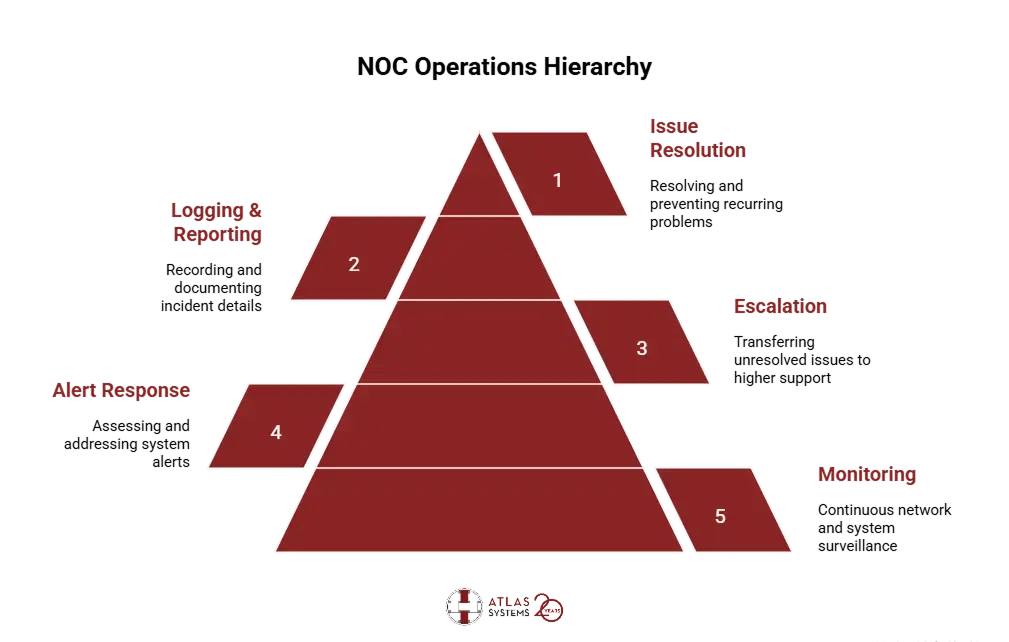
NOC workflows are not always identical. Some rely heavily on automation, while others are more manual. But the goal stays consistent: catch what is going wrong, fix what you can, and pass along what needs another layer of support.
Most NOCs handle a mix of monitoring, alert review, incident resolution, and system reporting. The specifics vary depending on the environment, but these are the functions that tend to show up across the board:
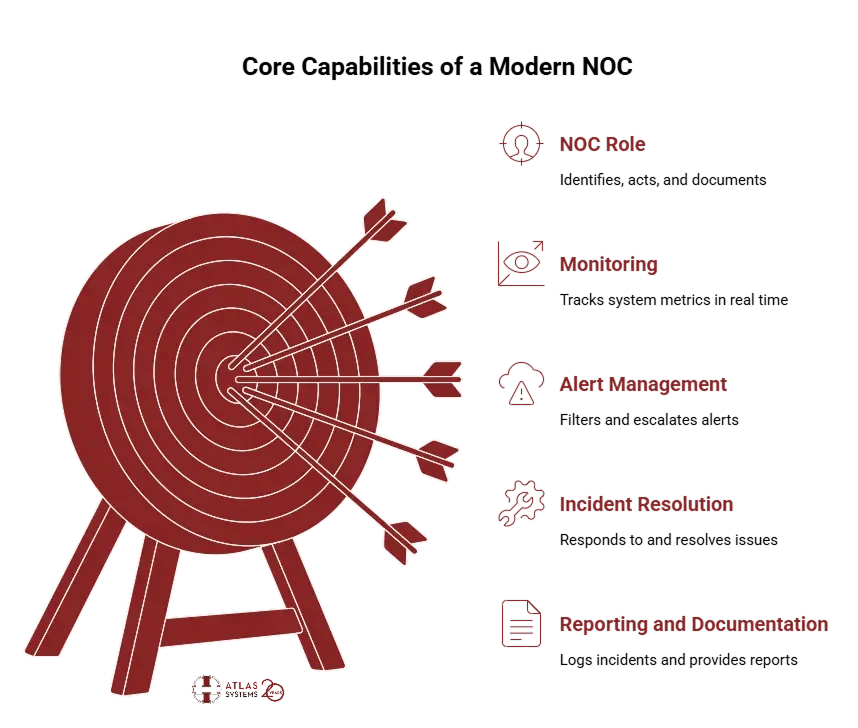
In most environments, some of these tasks are automated. Others still require a person to make a decision. The structure depends on the size of your team and the tools you are working with, but the role stays consistent: identify, act, and document.
For most teams, the value of a NOC shows up in small ways that add up, fewer disruptions, faster fixes, and better visibility into what is actually happening on the network. Whether it is run in-house or outsourced, an effective NOC helps reduce gaps in coverage and prevent problems from getting worse.
Here are a few of the main benefits:
These benefits do not always show up immediately. But over time, the impact of having a dedicated operations layer, one that stays on top of alerts and sees patterns others might miss, tends to reduce risk and improve how infrastructure is maintained.
Running a NOC internally gives you more control over operations, but it also requires dedicated resources. Outsourcing shifts some of that responsibility to an external team. The right approach depends on how much you want to manage directly — and what your team can support.
| Feature | In-house NOC | Outsourced NOC |
|---|---|---|
| Setup Cost | Typically involves upfront costs for hardware, monitoring tools, and staff hiring | Costs are more predictable and often lower, since infrastructure is managed by the provider |
| Time to Deploy | May take several months depending on internal approvals and setup time | Can often be deployed in a few weeks using preconfigured systems |
| Staff Required | Needs dedicated personnel across shifts — including weekends and off-hours | Coverage is handled by the vendor, with 24x7 staffing built in |
| Scalability | Scaling requires hiring, additional training, and system changes | Easier to scale up or down depending on usage or workload |
| 24x7 Coverage | Requires multiple shifts or on-call rotation to maintain round-the-clock monitoring | Built-in 24x7 availability as part of the standard support model |
| Tooling | You choose, configure, and maintain your own tools | Vendors typically bring their own tools or integrate with your systems |
| Control | Full visibility into systems, workflows, and changes | Less control over internal tools, but SLAs define responsibilities |
| Maintenance Burden | Internal teams handle updates, patches, and platform support | The vendor takes responsibility for ongoing updates and support tasks |
Most organizations fall somewhere in between. You might start with an outsourced NOC while building internal capacity or use external support only during off-hours. What works best often depends on where your team is stretched — and how critical full-time coverage is for your environment.
These three teams often get grouped together, but they serve very different purposes. Each focuses on a distinct part of IT operations, with different priorities, workflows, and escalation paths.
Network Operations Center (NOC)
Security Operations Center (SOC)
Help desk
In some environments, these teams coordinate — for example, a Help Desk might escalate a recurring issue to the NOC, or the NOC might notify the SOC if a pattern looks suspicious. But each serves a different layer of the operational stack.
AI is becoming more common in network operations, not as a full replacement for people, but as a way to reduce manual effort and surface problems faster. Most of the impact shows up in how incidents are detected, grouped, and assigned.
Here are some examples of where AI adds value:
In most cases, AI supports the NOC team; it does not replace them. Human review is still critical, especially for incidents that do not follow a known pattern. But with the volume of data most teams handle, AI helps cut through the noise.
Choosing the right NOC monitoring tools isn’t about what’s trending—it’s about what actually fits your operational needs. Here’s what to look for:

At Atlas Systems, we help enterprises build, manage, and optimize their NOC environments with tools that align with real-world operations, not just checkboxes. Whether you're building from scratch or modernizing an aging setup, we bring:
If you’re rethinking how your NOC tools serve your business, we’re ready to help you build something better—end-to-end, and built to last. Let’s talk!
A NOC focuses on the performance and availability of your IT systems, while a SOC monitors for security threats and manages incident response for cyber risks.
The NOC team monitors infrastructure, identifies issues, creates incident records, and either resolves or escalates them depending on scope and severity.
No. A Help Desk supports end users with device or access issues. A NOC monitors the health of systems and networks, often without direct user interaction.
Many do. Some are staffed continuously, while others rely on scheduled shifts or external providers to maintain round-the-clock coverage.
Yes, but it depends on staffing and workload. Running a NOC in-house requires people, tooling, and shift coverage, which may be difficult for smaller teams to sustain.
AI is not required, but it can help by reducing alert fatigue, flagging anomalies, and organizing response workflows, especially in larger environments.
Costs vary widely. In-house models require investment in tools and staff, while outsourced services are usually priced monthly based on coverage and scope.
Yes. NOCs often align with ITIL practices, especially in areas like incident management, service monitoring, and change control support.

%20(1).jpg)