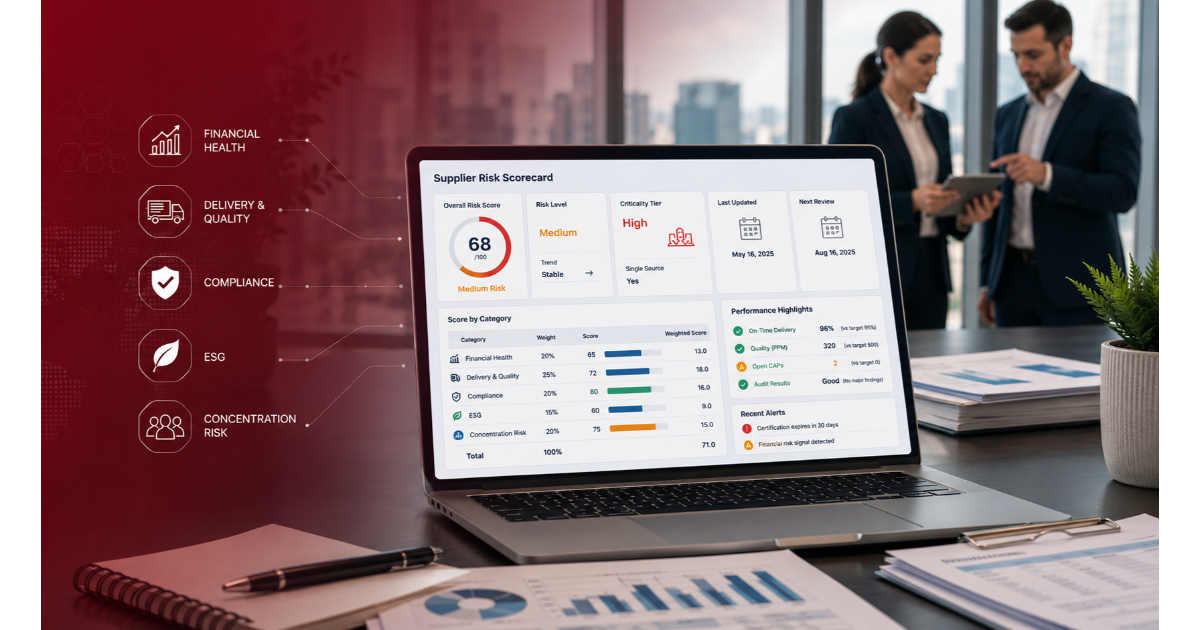
A 2025 BlueVoyant survey found 97 percent of organizations reported negative impacts from a supplier breach in the past twelve months, up from 81 percent the year before, despite rising budgets for third-party risk programs. Most of that gap traces back to the same root cause: a spreadsheet or a point-in-time review cannot represent a supplier relationship that changes continuously.
The market for supplier risk assessment tools spans two very different categories. Full third-party risk management platforms cover onboarding, questionnaires, monitoring, and remediation across the entire supplier lifecycle. Point solutions specialize in one signal, most often cyber security ratings or financial health, and are meant to feed into a broader program rather than run one on their own. Knowing which category a tool falls into matters more than any single feature on its page.
What Is a Supplier Risk Assessment Tool?
A supplier risk assessment tool is software that scores, tracks, and monitors supplier risk across categories like cybersecurity, financial stability, and regulatory compliance, replacing manual spreadsheet-based reviews with a system that scales as the supplier base grows. Full-lifecycle platforms cover onboarding through offboarding, while point solutions focus on a single risk domain.
How We Evaluated These Tools
This list covers 10 tools spanning both categories, since a fair comparison has to include what a buyer is actually choosing between. Each entry was evaluated on four criteria: lifecycle coverage (onboarding through offboarding versus a single risk domain), continuous monitoring depth, framework and compliance mapping, and integration with existing procurement or GRC systems. Pricing is excluded from scoring since nearly every vendor here uses custom quotes rather than published rates. This comparison reflects Atlas Systems' evaluation of publicly available product information, current as of September 2026.
Supplier Risk Assessment Tools Compared
| Tools |
Lifecycle coverage |
Continuous monitoring |
Framework mapping |
Best fit |
| ComplyScore® |
Full lifecycle |
Cyber, financial, compliance signals |
30+ frameworks |
Enterprises wanting full-lifecycle coverage without a GRC retrofit |
| Prevalent |
Full lifecycle |
Cyber and business risk feeds |
750+ assessment templates |
Programs wanting managed-services support alongside software |
| OneTrust |
Full lifecycle |
Vendor risk intelligence feed |
Broad privacy and compliance |
Enterprises already standardized on OneTrust for privacy |
| ProcessUnity |
Full lifecycle |
Risk data via Global Risk Exchange |
Multiple standard frameworks |
Mature enterprise TPRM programs with dedicated staff |
| Venminder |
Full lifecycle, managed-service heavy |
Human-reviewed document monitoring |
Financial services focus |
Banks and credit unions wanting expert-reviewed assessments |
| Bitsight |
Point solution (cyber) |
Daily security ratings |
Not a compliance-mapping tool |
Programs that already have a TPRM platform and need cyber scoring |
| Panorays |
Cyber-focused, some lifecycle features |
External scan plus vendor questionnaires |
Security-standard mapping |
Security teams wanting scan data and vendor collaboration together |
| Aravo |
Full lifecycle |
Monitoring via data-provider connectors |
Configurable risk domains |
Global enterprises with complex, high-volume vendor networks |
| Black Kite |
Point solution (cyber) |
Ratings plus financial impact modeling |
Compliance mapping add-on |
Programs wanting cyber risk translated into dollar exposure |
| RapidRatings |
Point solution (financial) |
Financial Health Rating refresh |
Not applicable |
Programs needing supplier financial viability data specifically |
| SecurityScorecard |
Point solution (cyber) |
Daily security ratings |
Not a compliance-mapping tool |
Programs needing a standalone cyber ratings feed |
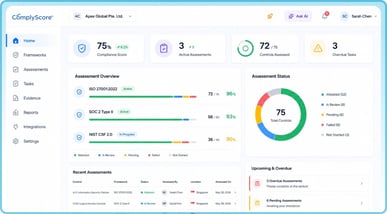
ComplyScore®
ComplyScore® is built as a full-lifecycle supplier risk platform rather than a general GRC tool adapted for third-party risk. Engagement-aware tiering routes each supplier to the right assessment depth based on scope and data sensitivity, and continuous monitoring correlates cyber, financial, and compliance signals into routed tasks instead of alerts nobody acts on.
Why it might work for you: Organizations replacing a fragmented mix of spreadsheets and point solutions get one system covering intake, assessment, monitoring, and remediation, without stitching together separate cyber-ratings and GRC tools.
Top features:
Pros:
- Assessment cycles run under 10 days and reach 90 to 95 percent supplier coverage on mature programs [Atlas Systems proprietary data]
- API-first architecture connects to existing GRC, ERP, and procurement systems instead of replacing them
- Enviri Corporation, managing more than 25,000 vendors across 31 countries and three ERP systems, unified a fragmented process on the platform without a disruptive migration
Prevalent
Prevalent, part of Mitratech, is a full-lifecycle third-party risk platform combining automated assessments with an optional managed-services layer where Mitratech's own analysts review vendor documents on a client's behalf.
Why it might work for you: Programs that want software plus expert human review of complex artifacts like SOC 2 reports, without building that review capacity internally, get both in one contract.
Key features:
- Library of 750+ standardized risk assessment templates
- Vendor Threat Monitor tracks cyber and operational signals continuously
- Managed services option for full assessment outsourcing
Pros:
- Strong template library reduces setup time for common frameworks
- Managed services provide a fallback for under-resourced teams
Cons:
- Reliance on the managed-services layer for complex reviews means some risk decisions run through Mitratech's analysts rather than the buyer's own team
- Reviews describe the interface as capable but less intuitive than newer platforms
OneTrust
OneTrust Third-Party Management extends the company's broader privacy and governance platform into vendor risk, aligning assessment workflows with regulations like GDPR and HIPAA.
Why it might work for you: Organizations already running OneTrust for privacy management get third-party risk in the same ecosystem, avoiding a separate vendor relationship and login for supplier assessments.
Key features:
- Vendor risk intelligence feed with pre-assessed vendor profiles
- Workflow automation tied to privacy and compliance frameworks
- Centralized documentation and policy management
Pros:
- Deep integration with OneTrust's privacy suite for organizations already on the platform
- Broad framework coverage across privacy and compliance domains
Cons:
- Users on prospect calls with Atlas Systems described the platform as heavy to configure and maintain outside a dedicated OneTrust administrator role
- Third-party risk is one module within a much larger platform, which can mean more complexity than a purpose-built TPRM tool for teams that only need vendor risk
ProcessUnity
ProcessUnity automates the third-party risk lifecycle from onboarding through offboarding, built around its Global Risk Exchange for pre-assessed vendor risk profiles.
Why it might work for you: Enterprise programs with dedicated TPRM staff who want granular, configurable workflows and a large risk-data exchange get a platform built specifically around that scale.
Key features:
- Global Risk Exchange with vendor risk profiles across thousands of companies
- AI-driven control reviews and evidence validation
- Configurable workflows for vendor onboarding and due diligence
Pros:
- Purpose-built for TPRM rather than adapted from a broader GRC suite
- Integrates with external intelligence sources like SecurityScorecard and RiskRecon
Cons:
- Configuration depth means implementation typically requires a dedicated TPRM function to get full value
- Best suited to programs with existing process maturity rather than teams starting from spreadsheets
Venminder
Venminder pairs TPRM software with Vendiligence, a managed-service model where Venminder's internal analysts manually review and risk-rate vendor documents like SOC reports and business continuity plans.
Why it might work for you: Regulated financial institutions that need expert-reviewed vendor documentation, and want that review handled by certified analysts rather than internal staff, get a model built specifically for that need.
Key features:
- Vendiligence managed document review by certified analysts
- Contract and SLA management alongside risk assessment
- Regulatory mapping built for financial services
Pros:
- Human-reviewed risk ratings for complex vendor artifacts, not just automated scoring
- Strong fit for banks and credit unions with financial-services-specific compliance needs
Cons:
- Reliance on Venminder's analysts for document review means risk-rating decisions depend on external staff rather than the buyer's own team
- More narrowly built for financial services than for broad enterprise supplier programs
Bitsight
Bitsight is a cybersecurity ratings platform, not a full TPRM system. It produces daily security ratings for organizations and their suppliers based on continuously scanned external data.
Why it might work for you: Programs that already run a TPRM platform and need a dedicated, well-established cyber ratings feed to plug into it get a specialist tool rather than a bolt-on feature.
Key features:
- Daily security ratings from 250 to 900 based on external scanning
- Integrations with SOAR platforms, ServiceNow, Jira, and Power BI
- Analytical forecasting for future security trajectory
Pros:
- Strong institutional acceptance and integration ecosystem for complex organizations
- Daily rating refresh gives a current view of external cyber posture
Cons:
- Covers cyber risk only, not financial, compliance, or operational risk domains
- Advanced vendor-risk-management workflows require add-on services beyond the core ratings product
Panorays
Panorays combines external attack surface scanning with vendor self-assessment questionnaires, positioning itself closer to a full cyber-focused TPRM platform than a pure ratings provider.
Why it might work for you: Security teams that want external scan data and vendor questionnaire collaboration in a single workflow, without separately licensing a ratings tool and a questionnaire platform, get both combined.
Key features:
- Automated, dynamic security questionnaires
- External attack surface assessment combined with business context
- Vendor collaboration workflow for remediation
Pros:
- Combines external and self-reported data in one view, reducing tool sprawl for cyber-focused programs
- Vendor collaboration features go beyond a pure ratings product
Cons:
- Built around cybersecurity risk specifically, with less depth on financial or regulatory-compliance risk domains
- Smaller platform footprint than full enterprise TPRM suites, which matters for programs needing broad lifecycle governance
Aravo
Aravo is a full-lifecycle third-party risk platform for large global enterprises, built around a configurable connector framework that pulls in data from providers like Dun & Bradstreet, RapidRatings, Bitsight, and SecurityScorecard.
Why it might work for you: Enterprises managing millions of third-party records across multiple risk domains, who want one platform orchestrating several external data feeds rather than juggling them separately, get that orchestration built in.
Key features:
- Configurable connector framework for third-party data providers
- Specialized risk domain applications for ABAC, ESG, and financial compliance
- AI and machine learning for automated screening and continuous monitoring
Pros:
- Scales to millions of third-party records for the largest global enterprises
- Broad connector ecosystem reduces the work of integrating separate risk-data providers
Cons:
- Complexity and configuration depth are built for large enterprise programs, less suited to mid-market teams
- No native mobile app, which some reviews flag as a gap for field or executive use
Black Kite
Black Kite is a cyber risk ratings platform that layers financial impact modeling and compliance mapping on top of standard security scoring, using non-intrusive OSINT-based scans.
Why it might work for you: Programs that need to translate a cyber risk score into an estimated dollar exposure for leadership reporting get that financial-impact layer as a built-in feature rather than a manual calculation.
Key features:
- Letter-grade security ratings from OSINT-based scanning
- Financial impact modeling tied to identified vulnerabilities
- Bridge module for automated vendor outreach during major security events
Pros:
- Financial impact modeling is a genuine differentiator for board-level risk reporting
- Non-intrusive scanning requires no vendor cooperation to generate an initial rating
Cons:
- Covers external cyber risk only, with no native workflow for broader TPRM lifecycle stages like onboarding or contract management
- Support responsiveness is described inconsistently across reviews, with some noting slower resolution on false positives
RapidRatings
RapidRatings is a financial health analytics firm, not a general third-party risk platform. Its core product, the Financial Health Rating, scores a supplier's financial stability from 0 to 100 using their own financial statements.
Why it might work for you: Procurement and credit teams that need an objective, data-driven view of supplier financial viability, distinct from cyber or compliance risk, get a tool built specifically for that one question.
Key features:
- Financial Health Rating on a 0 to 100 scale with 15 component scores
- 12 to 36-month forward-looking financial stability projection
- Private company financial data collection service
Pros:
- Financial health scoring depth exceeds what a general TPRM platform typically provides natively
- Long track record and broad private-company data coverage across 150 countries
Cons:
- Covers financial risk only, with no cyber, compliance, or operational risk scoring
- Functions as a data source that feeds into a broader program rather than a standalone risk management system
SecurityScorecard
SecurityScorecard is a cybersecurity ratings platform providing continuous monitoring and a widely recognized letter-grade scoring system for external security posture.
Why it might work for you: Programs wanting an approachable, easy-to-read cyber ratings system for executive reporting, with strong integration options for ticketing and collaboration tools, get a well-established option in that specific niche.
Key features:
- A-F letter grade security ratings
- Continuous monitoring with daily updates
- Integrations with Jira and other collaboration platforms
Pros:
- Letter-grade format is easy for non-technical executives to interpret
- Strong integration options for ticketing and collaboration workflows
Cons:
- Covers cyber risk only, not a substitute for a full supplier risk lifecycle platform
- Best used as one data feed within a broader TPRM program rather than the program itself













































.webp)

%20(1).jpg)

.webp)
.webp)
.webp)